Friday, 29 September 2017

Imran Khan announces public gathering in Sukkur tomorrow


آٹھ محرم الحرام کے جلوس: کراچی سمیت مختلف شہروں میں موبائل فون سروس بحال ہونا شروع


کراچی سمیت ملک بھر کے مختلف شہروں میں آٹھویں محرم الحرام کے موقع پر   کئی شہروں میں معطل ہونے والی موبائل فون سروس اب بحال ہونا شروع ہوگئی ہے۔ 

کراچی میں نشتر پارک سے برآمد ہونے والا  8 ویں محرم الحرام کا مرکزی جلوس حسینیہ ایرانیاں پر ختم ہوا جب کہ جلوس کی گزر گاہوں سے ملحقہ سڑکوں کو کنٹینر رکھ کر بند کیا گیا۔
جلوس کی گزر گاہ ایم اے جناح روڈ اور صدر کا علاقہ ہے جہاں دس محرم کی رات تک دکانیں اور سڑک بند رہے گی جب کہ جلوس کی گزرگاہوں کو 9 سیکٹر اور 23 سب سیکٹر میں تقسیم کیا گیا ہے۔
شہر بھر میں موٹر سائیکل کی ڈبل سواری پر بھی پابندی ہے۔
لاہور:
لاہور میں 8 محرم الحرام کا مرکزی جلوس امام بارگاہ دربار حسین موری گیٹ سے برآمد ہوا جو لوہاری، انار کلی اور مال روڈ سے ہوتا ہوا پام اسٹریٹ انار کلی پہنچے گا۔
یوم عاشور پر پنجاب حکومت نے جلوس کے روٹ پر فوج اور رینجرز سے مدد طلب کر لی ہے جب کہ ٹریفک پولیس نے بھی نویں اور دسویں محرم الحرام کے لیے ٹریفک پلان جاری کر دیا ہے۔
پلان کے مطابق شاہدرہ سے آنے والی ٹریفک براستہ آزادی فلائی اوور ریلوے اسٹیشن آ سکے گی۔ سگیاں پل اور ائرپورٹ کی طرف رنگ روڈ کھلی رہے گی۔
فیروز پور روڈ سے آنے والی ٹریفک پی ایم جی چوک سے سگیاں پل جا سکے گی۔ سرکلر روڈ سے ٹریفک موری گیٹ کے راستے نیلا گنبد جائے گی۔
لاء کالج پنجاب یونیورسٹی سے اردو بازار کی طرف ٹریفک بند رہے گی جبکہ مستی گیٹ سے چوک ٹیکسالی تک بھی ٹریفک بند رہے گی۔ لوئرمال پر ضلع کچہری سے داتا دربارتک ملحقہ سڑکوں سے ٹریفک کا داخلہ بند ہوگا۔
موبائل فون سروس معطل
 کراچی، حیدرآباد، سکھر، شکارپور، کشمور، خیرپور اور جیکب آباد سمیت مختلف شہروں میں موبائل فون سروس بحال ہونا شروع ہوگئی ہے۔
پشاور 
پشاور میں آٹھویں محرم کے دو ماتمی جلوس برآمد ہو رہے ہیں، پہلا جلوس امام بارگاہ نجف علی شاہ کوچی بازار سے تین بجے کے بعد برآمد ہوگا جبکہ دوسرا ماتمی جلوس بچوں کا ہے جو رات آٹھ بجے امام بارگاہ امام حسین محلہ مرویحا سے برآمد ہوگا۔
پولیس حکام کے مطابق سیکیورٹی خدشات کی بناء پر اندرون شہر سیل ہے اور خاردار تاریں لگا کر راستے بند کردیئے گئے ہیں جب کہ شہر کے تجارتی مراکز اور تعلیمی ادارے بھی آج سے بند ہیں۔ 
پولیس کے علاوہ پاک فوج اور ایف سی اہلکار بھی تعینات ہیں جبکہ خفیہ کیمروں سے جلوسوں کی نگرانی کی جارہی ہے۔
ضلعی انتظامیہ نے تین روز کے لئے شہر میں موٹرسائیکل کی ڈبل سواری پر بھی پابندی عائد کردی ہے۔   
کوئٹہ 
محکمہ داخلہ بلوچستان نے عاشورہ محرم پر موبائل سروس کی بندش کے لئے وفاقی وزرات داخلہ کو مراسلہ ارسال کردیا، اجازت ملنے کے بعد 9 اور 10 محرم کو صوبے کے 4 اضلاع میں موبائل فون اور انٹرنیٹ سروس بند رکھی جائے گی۔
صوبائی محکمہ داخلہ نے نویں محرم کو ضلع بولان کے علاقے مچھ اور دسویں محرم الحرام کو کوئٹہ، جعفرآباد اور جھل مگسی میں موبائل فون اور انٹرنیٹ سروس بند رکھنے کی اجازت مانگی ہے۔

فیصل آباد، سرکاری سکول میں ہیڈ ماسٹر کی خاتون ٹیچر سے دست درازی کی کوشش


 فیصل آباد(سپیشل رپورٹر) مخلوط تعلیم والے گورنمنٹ پرائمری سکول مصطفی آباد جڑانوالہ میں دوران تدریس ہی ہیڈ ماسٹر نے اپنی ماتحت ایک خاتون ٹیچر کو ایک کمرے میں گھیر کر دست درازی کی کوشش کی جس کی چیخ و پکار پر سکول کے چند مرد ٹیچرز نے فوری طور پر پہنچ کر خاتون ٹیچر کو بچا لیاِِ، شکایت ملنے پر چیف ایگزیکٹو سکولز فیصل آباد مظفر جاوید اقبال چشتی نے انکوائری کے بعد ہیڈ ماسٹر کو جبری ریٹائرکر دیا جبکہ ڈی ای او ایلمنٹری نے اس خاتون ٹیچر کو بچانے والے ٹیچرز کو سزا دیتے ہوئے پانچ پانچ سال کیلئے ان کی انکریمنٹ روک دیں۔ اس کی اطلاع چیف ایگزیکٹو کو دی گئی جنہوں نے ذرائع کے مطابق ڈی ای او ایلمینٹری کو سزا پر نظرثانی کرنے کیلئے لیٹربھیج دیا۔ جب متعلقہ ڈی ای او سے پوچھا گیا تو انہوں نے اس واقعہ کو ایک معمولی واقعہ قرار دیتے ہوئے کہا کہ میڈیا خوامخواہ ہمارے پیچھے پڑ گیا ہے اس طرح کے واقعات تو اس محکمہ میں ہوتے رہتے ہیں تاہم اس واقعہ کو ابھی تک خفیہ رکھا جا رہا ہے اور متاثرہ خاتون ٹیچر کو بھی تسلی دی جا رہی ہے ۔معلوم ہواہے کہ اس واقعہ میں ایک اعلیٰ حکومتی عہدیدار کے پی اے کی طرف سے مداخلت کرتے ہوئے ہیڈ ماسٹر کو بچانے کی کوشش کی جا رہی ہے ۔مصدقہ ذرائع کے مطابق گورنمنٹ پرائمری سکول مصطفی آباد جڑانوالہ میں چند روز قبل سکول کے ہیڈ ماسٹر نے اپنی ماتحت ٹیچر کو ایک خالی کمرے میں اکیلے پا کر اس سے دست درازی شروع کر دی جس پر خاتون ٹیچر نے چیخ و پکار شروع کر دی ،شور سن کر سکول کے چند مرد ٹیچرز فوری طور پر کمرے میں پہنچ گئے اور خاتون ٹیچر کو ہیڈ ماسٹر کے چنگل سے نجات دلائی اوراس کو لعن طعن کی۔ اس واقعہ کے خلاف خاتون ٹیچر نے چیف ایگزیکٹو ایجوکیشن سکولز فیصل آباد کو تحریری درخواست دی جنہوں نے سابق ڈی ای او ایلمینٹری مظفر وڑائچ کو تحقیقات کرنے کا حکم دیا جنہوں نے ہیڈ ماسٹر کو قصور وار قرار دیا جس کے بعد ہیڈ ماسٹر کو معطل کر دیاگیا مگر ٹیچر نے اس سزا کو ناکافی قرار دیا جس کے بعد ایک بار پھر باقی ٹیچرز کے بیانات لئے گئے جس کے بعد اس ہیڈ ماسٹر کو جبری ریٹائر کر دیا گیا۔ اسی دوران ڈی ای اومظفر وڑائچ کا تبادلہ ہو گیا اور ان کی جگہ ڈی ای او ایلمینٹری انور پنسوتہ نے چارج سنبھال لیا اوران تمام ٹیچرز کی سالانہ ترقیاں پانچ پانچ سال کے لئے روک لیں جنہوں نے خاتون ٹیچر کوبچایا تھا۔ اطلاع ملتے ہی ان ٹیچرز نے اعلی حکام کو صورتحال سے آگاہ کر دیا جس پر معاملہ کو نظر ثانی کیلئے دوبارہ ڈی ای او انور پنسوتہ کے پاس بھیج دیا گیا۔ اس سلسلے میں ’’پاکستان ‘‘نے جب ڈی ای او سے رابطہ کیا اور ان سے حقائق جاننے کی کوشش کی تو انہیں سخت ناگوار گزرا اور میڈیا پر الزام تراشی کرنے لگے اوراسے ایک معمولی واقعہ قرار دیا ،ٹیچرز کی سزائیں ابھی زیر التوا بتائی جاتی ہیِں۔

یوم عاشورہ کے موقع پرراولپنڈی ،اسلام آبادمیٹروبس سروس بندرہے گی


یوم عاشورہ کے موقع پرراولپنڈی ،اسلام آبادمیٹروبس سروس بندرہے گی ۔
میڈیارپورٹس کے مطابق یوم عاشورکے موقع پرمیٹروبس انتظامیہ نے جڑواں شہروں میں میٹروبس سروس بندرکھنے کافیصلہ کیاہے ،میٹروبس سروس بندرکھنے کافیصلہ سیکیورٹی خدشات کے باعث کیاگیا۔راولپنڈی میں یوم عاشورہ کے موقع پرموبائل سروس بھی  بندرہے گی جبکہ اسلام آبادمیں موبائل فون سروس بندنہیں ہوگی۔

Friday, 22 September 2017

Remarkable E-ink Writing Slate Reviews – Great Tablet, But Not Ready for Prime Time

Remarkable E-ink Writing Slate Reviews - Great Tablet, But Not Ready for Prime Time e-Reading Hardware Link Post Reviews

If that early buzz for the $600 Remarkable tablet had you wishing that you had gotten in on the early pre-orders, I have good news for you:
It's not ready yet.
A handful of reviews were posted on Friday, and they show reveal that the Remarkable still has a way to go in the software department (this could explain why it missed the official mid-August shipdate).
This writing slate measures 10.1" by 6.9" by 0.36" thin, and according to official specs it weighs about 12 ounces. runs a proprietary Linux OS on a 1GHz CPU with 512MB RAM and 8GB of internal storage (there is no card slot).
It has a 10.3" Carta E-ink display (1872 x 1404 resolution - 226 PPI).  The Remarkable doesn't have a frontlight, but it does have a capacitive touchscreen and a  Wacom stylus that supports 2,048 levels of pressure sensitivity and 512 degrees of tilt detection.
Aside from the screen and the stylus, those specs sound like what you can find on a $100 to $200 ereader, and you can also find cheaper ereaders that are almost s good as the Remarkable (like the Onyx Boox M96, which costs $430, runs Android with a 9,7" E-ink screen, and has both dual-touchscreens).
Is the remarkable worth the extra $170 for an ereader cum writing slate?
Based on the following reviews, I would say yes - once the software is done.
At £529 just for the tablet, with the pen sold separately, this is a seriously expensive device. It’s fantastic at what it does, and the crowdfunding campaign that got it off the ground has been a resounding success, but prioritising the writing experience above all else has forced some compromises.
With no backlight or frontlight, a Kindle is still probably your best bet if you're mainly after an eBook reader. Digital artists that aren’t interested in working purely in greyscale will be better served by an iPad Pro or Microsoft Surface, even if their respective styli can’t match ReMarkable for convincing feel.
I was excited about the potential of the reMarkable tablet, but unfortunately, it didn't quite meet my expectations.
That said, I still think it's an incredible product. The instantaneous nature of the ink is truly impressive, and every person I showed it to was blown away. The prospect of being able to take handwritten notes but save them digitally — not to mention sync them to your computer — is thrilling for those who prefer notepads over notepad apps.
But in making the quickest writing and drawing experience it could, I felt like reMarkable sacrified quickness on the other end. The device's tendency to burn-in was a real problem, as was the slowness to turn the page or navigate back to the home screen. The tablet's user interface still needs work to make it more intuitive, and the overall design could look slightly more modern. In its current form, paying $600 for an E Ink tablet like this in 2017 still seems too steep to me.
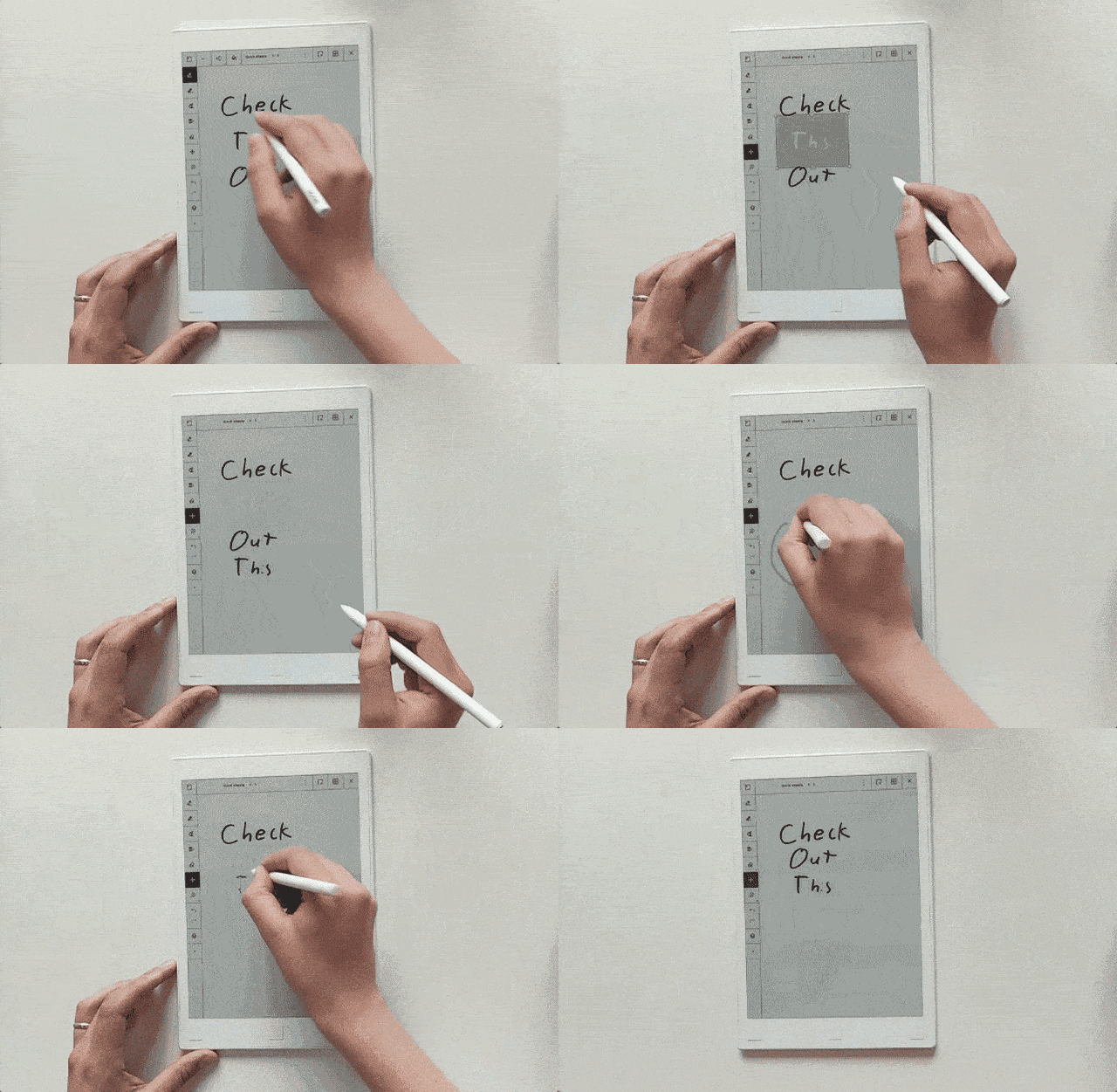
Even the best paper notebook needs a good pen—or in this case, a good stylus, to be worth using. The reMarkable comes with a Wacom stylus that works impressively well on the e-ink display, with hardly any latency. It’s tilt and pressure sensitive for better accuracy, but the results can be shaky, so don’t count on it replacing your sketchbook just yet. Those kinks aside, palm rejection works great, and the stylus doesn’t have a battery, so no need to awkwardly plug it into the bottom of your tablet.
When you’re done jotting down ideas for your screenplay or doodling away, you can bounce over to your eBooks tab and dive into The Jungle or Crash Override. Unfortunately, you won’t get as good a reading experience as you’d find on a Kindle due to a few shortcomings.
I found that text doesn’t look as crisp (limited font options don’t help things, either) and then there’s no bookstore so getting your digital library onto the reMarkable is a hassle. If those issues don’t bother you, there are some nice perks like a larger screen and the ability to write notes into a book’s margins, which you can’t do with a Kindle.
The reMarkable's amazing writing experience is a one-of-a-kind feature that when combined with its cloud-sync capabilities and Photoshop-esque editing, makes it a great tool for note takers and artists alike. Writing on the slate is one of the most realistic, comfortable experiences I've had on a tablet, rivaled only by using an actual pen and paper.
Of course, $599 may be a tough price to swallow for some, especially when the device is made just for writing, drawing and reading. For a more feature-rich tablet, consider the $649 10.5-inch iPad Pro, which supports Apple's $99 Pencil stylus. It's $149 more expensive, though, and writing on its glass doesn't feel as natural. However, the iPad has Apple's huge library of apps and games, while reMarkable has a much more limited offering. Still, the reMarkable has to be used to be truly believed, as writers and artists looking for the best marriage of digital and analogue won't find a better option.
The drawing is great, but navigating the tablet's interface is less so. You'll basically have to memorize the meanings of it icon-labeled on-screen buttons. I still routinely do things like delete an entire page of notes when I meant to select the eraser (undo to the rescue), or create a new page when I mean to navigate to anther digital notebook. I also found myself wanting to touch the on-screen buttons with my finger, as not to move the stylus away from what I was writing, and, frustratingly, this does work but only about 50 percent of the time.
In terms of ereading features, the reMarkable is very basic. It supports PDF and DRM-free ePub files, but the software is still a work-in-progress so that makes it hard to review at this point. They plan on adding more features over time; I’ll update this review to reflect any changes as they get added.
At present there’s no table of contents, no dictionary, no bookmarks, no search, no active hyperlinks, no back button, no annotations list, no pinch-zooming, no finger-swipe page turning.
What it does offer is a jump to page option and you can view a list of thumbnails to move around parts of a book.
There are a couple of different ways to zoom in. It has a cropping option that works quite well, and there’s a zoom dial to zoom in and out in increments. Zooming resets with each page turn but cropping remains.
You can add notes and highlights with the stylus, of course, but there is no list to view them or way to add bookmarks so it makes it kind of a hassle to find them unless you remember the page number they were on or manually scan through thumbnail view.
The pen’s stellar performance stands in contrast to the rest of the experience, unfortunately.
The ReMarkable tablet suffers from the telltale limitations of E Ink technology: Tapping on a menu key or scroll wheel basically guarantees a delay and screen flashes while the tablet refreshes. It doesn’t come close to the responsiveness of the stylus, and it’s incredibly frustrating.
The ReMarkable tablet’s battery life is a little better than its performance, but it didn’t last as long as I’d like. After a typical 9-to-5 day of jotting down reminders, organizing my to-do list, and absent-mindedly doodling, I could count on the 3,000mAh battery dipping well below 40 percent by midweek.
ReMarkable’s engineers say they’re targeting two weeks of standby time, which seems a little optimistic. But we’ll have to take their word for it.

How to Visualize Your Data With Grafana [Q+A]


Need to build an application around your data? Learn more about dataflow programming for rapid development and greater creativity. 
Welcome to another post in our series of interview blogs for the upcoming Percona Live Europe 2017 in Dublin. This series highlights a number of talks that will be at the conference and gives a short preview of what attendees can expect to learn from the presenter.
This blog post is with Daniel Lee, a software developer at Grafana. His tutorial is Visualize Your Data With Grafana. This presentation teaches you how to create dashboards and graphs in Grafana and how to use them to gain insight into the behavior of your systems. In our conversation, we discussed how data visualization could benefit your database environment.
Percona: How did you get into database technology? What do you love about it?
Daniel: I'm a developer and my first job was working on a transport logistics system, which was mostly composed of Stored Procedures in SQL Server 2000. Today, I would not build a system with all the logic in Stored Procedures — but that database knowledge is the foundation that I built everything else on. Databases and their data flows will always be the core of most interesting systems. More recently, I have switched from Windows to working with MariaDB on Linux. Grafana Labs uses Percona Server for MySQL for most of our internal applications (worldPing and Hosted Grafana). Working with Grafana also means working with time series databases like Graphite, which is also very interesting.
I enjoy working with data as it is one of the ways to learn how users use a system. Design decisions are theories until you have data to either back them up or disprove them.
Percona: Your presenting a session called "Visualize Your Data With Grafana." How does monitoring make DBAs' lives easier and how do graphs make this information easier to apply for DBAs?
Daniel: Good monitoring provides top-level metrics (i.e. throughput, number of errors, performance) for alerting, and other lower-level metrics to allow you to dig into the details and quickly diagnose and resolve an outage. Monitoring also helps you find any constraints (for example, finding bottlenecks for query performance: CPU, row locks, disk, buffer pool size, etc.). Performance monitoring allows you to see trends and lets you know when it is time to scale out or purchase more hardware.
Monitoring can also be used to communicate with business people. It is a way of translating lots of different system metrics into a measurable user experience. Visualizing your data with graphs is a very good way to communicate that information, both within your team and with your business stakeholders. Building dashboards with the metrics that are important to you rather than just the standard checklists (CPU, disk, network, etc.) allows you to measure the user experience for your application and to see long-term trends.
Percona: Why Grafana? What does Grafana do better than other monitoring solutions?
Daniel: Grafana is the de facto standard in open source for visualizing time series data. It comes with tons of different ways to visualize your data (graphs, heat maps, gauges). Each data source comes with its own custom query editor that simplifies writing complex queries, and it is easy to create dynamic dashboards that look great on a TV.
Being open source, it can be connected to any data source/database, which makes it easy to unify different data sources in the same dashboard (for example, Prometheus or Graphite data combined with MySQL data). This also means your data is not subject to vendor lock-in like it is in other solutions. Grafana has a large and very active community that creates plugins and dashboards that extend Grafana into lots of niches, as well as providing ways to quickly get started with whatever you want to monitor.
Percona: What do you want attendees to take away from your session? Why should they attend?
Daniel: I want them to know that you can make the invisible visible, with that knowledge start to make better decisions based on data. I hope that my session helps someone take the first step to being more proactive in their monitoring by showing them what can be done with Grafana and other tools in the monitoring space.
In my session, I will give an overview of monitoring and metrics, followed by an intro to Grafana. I plan to show how to monitor MySQL and finish off with a quick look at the new MySQL data source for Grafana.
Percona: What are you most looking forward to at Percona Live Europe 2017?
Daniel: Firstly, it is always great to have an excuse to visit Ireland (I'm an Irishman living in Sweden). I'm also looking forward to getting feedback from the community on Grafana's new MySQL data source plugin, as well as just talking to people and hearing about their experiences with database monitoring.
Check out the Exaptive data application Studio. Technology agnostic. No glue code. Use what you know and rely on the community for what you don't. Try the community version.

How to publish your own ebook

The internet has transformed just about every industry out there—including publishing. Anyone with a web connection can now post their thoughts for the world to see. And if you have literary aspirations, you can publish digital books on your own terms, rather than waiting for a nod from a publishing house or agent. In this guide, we'll show you the ropes of putting out your own ebooks.
If you're looking for help creating convincing characters, bleeding words onto the page, and editing your work, then you'll need a different set of instructions: We're not going to cover the whole process of writing a book from scratch. Instead, let's assume you've already written your masterpiece and put it in a digital text-based format like Microsoft Word. Once you've reached that point, here are the next steps you need to take to send your literary baby out into the world.
Your first step is to decide where you want your ebook to live. If you just want to share your brainchild with family and friends, you might opt for a simple file-sharing program. For something more professional, you can choose to publish your ebook on a variety of different platforms, reaching a potential audience of millions. Here are a few of your options.
File sharing: The quickest and easiest way to publish your ebook is to upload it to the web, create a shareable link, and then pass it around to your friends, Twitter followers, book clubs, and so on. Services like Dropbox, Google Drive, iCloud, and OneDrive all let you share files for free online. This isn't the most sophisticated publishing option out there: Readers will have to manually load the document onto their e-readers, and it won't show up in any ebook stores. On the bright side, you can get your book live in five minutes—and you won't even have to reformat your manuscript. If, however, you yearn for a more official product, then consider using this method to build up some early buzz about your work, or maybe to offer a preview chapter.
Kindle Direct Publishing: One of the most far-reaching and easy-to-navigate platforms is Kindle Direct Publishing from Amazon. The retail behemoth has sold millions of Kindles over the years, so you're guaranteed the opportunity to reach a wide audience on its platform. This free service is also relatively generous: You can set your own price for your ebook, and depending on what that price is, you keep up to 70 percent of what it brings in. We have more information on how this pricing works below.
Kobo Writing Life: Kobo's e-readers aren't as well known as Amazon's, but like the larger company, Kobo has its own ebook publishing platform, Kobo Writing Life. Again, the publishing process is simple and free, and your royalties can be as high as 70 percent, varying with the book's cost.
Smashwords: To go live on several ebook stores at once, including Kobo, consider Smashwords. This platform gives you 80 percent of the royalties from its own store, and 60 percent of the money your ebook earns from other stores. Like the other options, Smashwords is free and easy to use. The only downside is that books published on this platform won't be available on Amazon.
In terms of mechanics, these three publishing platforms are all very similar. If you have trouble deciding, then start with Amazon, where your potential audience will be bigger. That's the platform we'll focus on in the rest of this guide.
We won't take you through the self-publishing process for every platform. Instead, we'll show you how it works if you sign up with Kindle Direct Publishing. Of course, you can always upload your ebook to several platforms, but Amazon will offer you a few perks if you stay exclusively on the Kindle, like extra promotion for your book and inclusion in the Kindle Owners' Lending Library.
Amazon's process for self-publishing ebooks is refreshingly polished and straightforward. To begin with, you must make sure to put your document in a digital file and to format it properly. The Kindle Direct Publishing system can recognize simple formatting like bold and italic text and paragraph indentations. But don't push it too far—avoid using special fonts or headers and footers. Hit the Enter key to indicate new paragraphs, and use page breaks to indicate the ends of chapters. Amazon provides a full help page on the formatting guidelines you need to follow.
While you're formatting your work, take the time to proofread it as well. If you want your would-be audience to take you seriously and buy your work, your text must be free from weird formatting, spelling mistakes, and bad grammar.
Next, you need to put your literary creation into the Microsoft Word format, with a .doc or .docx extension. Most applications, including Google Docs and Apple Pages, can export in Word format. In Docs, choose File and Download as; in Pages, select File and Export to.
Once you've formatted your file and given it the proper extension, it's ready to upload to Amazon's servers. To do that, start by signing into your Amazon account, or creating an account if you don't already have one. Next, head to your Bookshelf page. The site will ask you for some details about your book, such as a title (obviously), a category, some keywords, and a brief description. Don't rush through this part: The information you enter now is what will attract readers to your ebook. At the moment, the Kindle Store shows that more than 100,000 new ebooks became available in the last month, so you're up against a lot of competition.
Speaking of attracting readers, your book also needs a cover. A beautiful, striking image will make a big difference in setting your ebook apart from the pack, so, depending how artistic you are, you might consider hiring a professional to create original cover art for you. A quick web search will turn up plenty of freelance designers, or you can head to a marketplace like Reedsy. Covers must be in JPEG or TIFF format, with an aspect ratio of 1.6:1, and ideally with dimensions of 2,560 by 1,600 pixels.
Filling out this information and then uploading your manuscript to the Kindle Store is so quick and simple that you might be tempted to rush the process. But we can't emphasize enough how important it is to first clean up your copy and then double- and triple-check your work. While you're looking at designers on Reedsy, you can also find editors, publicists, and others who can help your book make the best possible impression.
As you set up your Bookshelf profile and upload your book, Amazon will also ask you for your address and bank details, for when those royalty payments start flooding in, and the price you want to charge for copies of your ebook. The price is completely up to you, but most readers won't risk paying much for an unknown author. If you're just in it for the creative satisfaction, meanwhile, you can give away your work for free.
With Amazon, the royalties vary depending on how your book is priced. If you charge less than $2.99—which first-time self-publishers should probably do—then you will earn a cut of 35 percent. The higher the price, the higher percentage of the profits you'll earn; you can pull in up to 70 percent when your ebook's price is higher. You can find plenty of advice on Kindle pricing strategies online, but keep an eye out for special sales and promotions on price, such as an initial, time-limited $0.99 offer. These deals can help boost interest in your work.
Once you've entered all that information, you upload your manuscript, and you're done—your ebook is published and available on any Kindle device. It really is that simple. And you run into any snags during the digital self-publishing process, Amazon offers a bunch of tutorial videos that can help you out. Of course, actually turning your ebook into a sales success is much harder. You'll need social media buzz and good reviews to make any kind of impact on the digital self-publishing landscape.
If you want to put your book into actual physical form, then you have a couple choices. Amazon owns a service called CreateSpace that will print and bind your book so you can sell paperback copies. CreateSpace will handle all the details for you, like calculating the sales tax and making sure your book has an ISBN so it can be distributed and sold in stores. However, this service is not free: If you're self-publishing, you'll have to pay for your physical copies.
CreateSpace will charge you $0.85 to $2.15 for each copy it prints—the price depends on the number of pages and whether you need color printing. The service also takes a slice of any money your book earns in sales, leaving you with 40 to 80 percent of the profits. The price and royalty options depend on several different factors; CreateSpace provides a full breakdown on its website.
If you'd prefer more guidance, you can work with a more traditional self-publishing house. These agencies usually request minimum print runs in the region of 1,000 copies, though you can find some houses who will go lower. Your options vary hugely depending on how much assistance you want with the process and how much money you're willing to spend. No matter what you decide, you can find plenty of companies willing to help you become a published print author. To begin with, we'd recommend focusing on the much simpler process of digital self-publishing—and then deciding what to do from there.

Friday, 15 September 2017

توہین عدالت کیس ، الیکشن کمیشن کا عمران خان کے وارنٹ گرفتاری جاری کرنے کا حکم


اسلام آباد(آئی این پی) الیکشن کمیشن نے عمران خان کیخلاف توہین عدالت کیس کا فیصلہ سناتے ہوئے پی ٹی آئی چیئرمین کے وارنٹ گرفتاری جاری کرنے کا حکم دیتے ہوئے سماعت 25 ستمبر کے لئے ملتوی کردی،ایک ایک لاکھ روپے کے دو مچلکے بھی جمع کرانے کا حکم دیدیا ۔ جمعرات کو تحریک انصاف کے چیرمین عمران خان کے خلاف چیف الیکشن کمشنر کی سربراہی میں 5 توہین رکنی بینچ نے عدالت کیس کی سماعت کی، اس موقع پر اکبر ایس بابر کی طرف سے احمد حسن ایڈووکیٹاور پی ٹی آئی کی جانب سے ڈاکٹر بابراعوان الیکشن کمیشن میں پیش
ہوئے۔وکیل درخواست گزار نے کہا کہ الیکشن کمیشن نے ایک شخص کو ذاتی حیثیت میں طلب کررکھا ہے، جب طلب کیا گیا تو الیکشن کمیشن میں پیش ہونا چاہیے تھا، الیکشن کمیشن کے حکم کی تعمیل نہیں کی گئی۔ وکیل درخواست گزار نے کہا کہ اداروں کا احترام کرتے تو یہاں ہونا چاہیے تھا لہذا الیکشن کمیشن قانون کے مطابق کاروائی کو آگے بڑھائے۔عمران خان کے وکیل بابر اعوان نے دلائل دیتے ہوئے کہا کہ عمران خان کی الیکشن کمیشن کے خلاف دائر پٹیشن کی سماعت ہائی کورٹ کا لارجر بنچ کرے گا جس پر چیف الیکشن کمشنر نے استفسار کیا کہ کیا ہائی کورٹ میں آج ہی سماعت ہونی ہے۔بابر اعوان نے کہا چیف جسٹس نے لارجر بنچ بنا دیا ہے جوسماعت کرے گا جب کہ عمران خان الیکشن کمیشن کا احترام کرتے ہیں، جب کہیں گے عمران خان الیکشن کمیشن میں حاضر ہوں گے، عمران خان بیرون ملک تھے اور ایک گھنٹہ پہلے ہی واپس پہنچے ہیں۔الیکشن کمیشن نے عمران خان کو ذاتی حیثیت میں پیش ہونے کا حکم دیا تھا تاہم پیش نہ ہونے پر الیکشن کمیشن نے چیر مین تحریک انصاف کے قابل ضمانت وارنٹ گرفتاری جاری کر دیے جب کہ انہیں ایک لاکھ روپے کے 2 ضمانتی مچلکے بھی جمع کرانے کا حکم دیا ہے۔ الیکشن کمیشن نے کیس کی سماعت 25 ستمبر تک ملتوی کرتے ہوئے عمران خان کو ایک بار پھر طلب کیا ہے۔واضح ریے کہ عمران خان اس وقت لندن میں موجود ہیں اور انہوں نے آج ہی پاکستان واپس پہنچنا ہے جہاں وہ لاہور میں داتا دربار پر حاضری دینگے  دریں اثنا عمران خان کل لاہور میں ہونے والے ورلڈ الیون اور پاکستان کے درمیان کھیلے جانے والے تیسرے ٹی ٹوئنٹی میچ کو بھی دکھیں گے۔ علاوہ ازیں پاکستان تحریک انصاف کے رہنما فواد چوہدری نے کہا ہے کہ الیکشن کمیشن کو صبرکا مظاہرہ کرنا چاہیے تھا،الیکشن کمیشن نے جلد بازی کا مظاہرہ کیا ہے،الیکشن کمیشن ایک آئینی ادارہ ہے،عمران خان کے الیکشن کمیشن میں پیش ہونے میں کوئی حرج نہیں ہے،یہ ایک نارمل الیکشن کمیشن کا طریقہ کارہے،جس کو فالو کیا گیا،اتنی سیریس بات نہیں ہے۔جمعرات کو الیکشن کمیشن کی جانب سے عمران خان کے ورانٹ گرفتاری جاری کرنے پر اپنا ردعمل دیتے ہوئے فواد چوہدری نے کہا کہ کیس ہائیکورٹ میں لگا ہوا تھا،تو الیکشن کمیشن کو انتظار کرلینا چاہیے تھا۔ یہ ایک طریقہ کار ہے جس کو الیکشن کمیشن نے فالو کیا ہے۔ یہ کوئی انتی سیریس بات نہیں ہے۔ لیکن الیکشن کمیشن کو صبروتحمل کا مظاہرہ کرنا چاہیے تھا۔ عمران خان کی جانب سے بابر اعوان مسلسل الیکشن کمیشن میں پیش ہورہے ہیں ۔انہوں نے کہا کہ عمران خان خود الیکشن کمیشن میںپیش ہوں گے۔الیکشن کمیشن ایک ادارہ ہے اس کے سامنے پیش ہونے میں کوئی حرج نہیں ہے۔

نواز شریف کوجے آئی ٹی رپورٹ پر مجرم نہیں قرار دیاگیا ،جسٹس اعجاز افضل


سلام آباد (ڈیلی پاکستان آن لائن)پاناما نظرثانی کیس کی سماعت کے دوراج جسٹس اعجاز افضل نے اپنے ریمارکس میں کہا ہے کہ جے آئی ٹی رپورٹ کی بنیاد پر نواز شریف کو مجرم نہیں قرار دیا، پاناما جے آئی ٹی رپورٹ کو ناقابل تردید سچ تسلیم نہیں کیاگیا، نواز شریف کے وکیل خواجہ حارث نے اپنے دلائل میں کہا کہ جے آئی ٹی رپورٹ نامکمل اور اس میں خامیاں ہیں،نامکمل رپورٹ کی بنیاد پرریفرنس دائرنہیں ہوسکتالیکن نیب کو براہ راست ریفرنس دائر کرنے کاحکم دیاگیا،خواجہ حارث کا کہنا تھا کہ جے آئی ٹی نے زیادہ تر دستاویزات ذرائع سے حاصل کیں، کوئی عدالتی مثال نہیں ملتی جس میں ایک اثاثہ ظاہر نہ کرنے پرنااہل کیاگیاہو اور ہمیں باہمی قانونی معاونت کے تحت کئی قانونی دستاویزات تاحال نہیں ملیں، جسٹس اعجاز افضل نے ریمارکس دیتے ہوئے کہا کہ رپورٹ میں خامیوں کا فائدہ آپ کو ہوگااور ٹرائل کورٹ میں آپ کو جرح کا مکمل موقع ملے گا۔ خواجہ حارث نے موقف اختیار کیا کہ جے آئی ٹی کو مکمل رپورٹ پیش کرنے کا حکم دیا گیا تھا، نامکمل رپورٹ کی بنیاد پر فیصلہ نہیں کیا جاسکتا، جسٹس عظمت نے سوال کیا کہ کیا آپ ہمیں یہ کہہ رہے ہیں کہ تحقیقات جاری رکھنے کا حکم دیں؟،اس پر جسٹس اعجاز افضل نے کہا کہ ٹرائل کورٹ نے جے آئی ٹی رپورٹ پر کارروائی کرناتھی ، ہم نے فیصلہ لکھنے میں احتیاط برتی ۔


loading...

Thursday, 14 September 2017

Panama case petitioners misled SC about Wage Protection System in UAE

Panama case petitioners misled SC about Wage Protection System in UAE

Panama case petitioners misled SC about Wage Protection System in UAE
ISLAMABAD: The Wage Protection System (WPS) introduced in 2009 in the UAE is not fully implemented even today and around 30 percent foreign employees were not registered with it till the end of 2016.
The petitioners in the Panama case didn’t inform the apex court of the correct position on this point because of which honourable Justice Ejaz Afzal Khan remarked on Wednesday that salary of the chairman of FZE Capital must have been transferred into the account of Respondent No1 (Muhammad Nawaz Sharif), otherwise, his ‘Iqama’ would have been cancelled because of the Wage Protection System under which salaries were transferred electronically. It was wrongly implied by the petitioners on the basis of the JIT report that mere mentioning of the rules in WPS regarding electronic transfer of monthly salary belies the claim of former prime minister Nawaz Sharif that he never received the salary from his son’s company FZE Capital.
It was submitted before the Supreme Court that Nawaz Sharif remained the chairman of the UAE company FZE Capital from 7 August, 2006 until 20 April, 2014 and according to the agreement, his salary was 10,000 dirhams per month. It was argued that this salary was not declared by Nawaz Sharif and thus he should be disqualified. The counsel of Nawaz Sharif, however, has responded that Nawaz never withdrew any salary from this company that his employment status in the company was for obtaining the ‘Iqama’ for the UAE visa and travel facilitation. The apex court in its July 28 verdict declared that as it is admitted by the counsel of Nawaz Sharif that he was entitled to withdraw salary from FZE Capital so his un-withdrawn salary was his ‘receivable’, hence his asset and failing to declare the same in the 2013 general elections nomination papers attract his disqualification under Article 62(1)(f) of the Constitution.
While explaining the arguments of counsels from both sides, the Supreme Court in its July 28 verdict did mention the argument forwarded by the lawyer of the petitioner as follows; “that the respondent denied withdrawal of salary, but payment of salaries to all employees electronically, through the Wage Protection System, under Ministerial Resolution No. (788) for 2009 on Wage Protection used by United Arab Emirates Ministry of Labour and Rules 11(6) and 11(7) of the Jebel Ali Free Zone Rules, would belie his stance”. However, the same point was neither discussed nor made basis while passing the final order by the SC and Nawaz Sharif was disqualified on the basis of definition of ‘asset’ by declaring his un-withdrawn salary as his ‘receivable’.
As a matter of fact, the UAE, which is the first country in the region to introduce the wonderful WPS for ensuring rights and timely payment of salaries to labourers, is still struggling to fully implement this system. The issue repeatedly discussed in UAE media and even the latest news stories in leading UAE newspapers reflect that much is yet to be done to fully implement the WPS. Stories as late as in May 2017, December 2016 and October 2016 highlight the same. The National, Khaleej Times and Gulf News stories can be easily searched on this subject. Official statement of the UAE government officials available on official websites also reflect the same that all-out efforts were being made to fully implement the WPS but hundreds of thousands are yet to be registered.
The UAE Ministry of Labour (renamed as the Ministry of Human Resource and Emiratisation in February 2016) started implementing the wages system from the big companies having large number of employees and licensed and LLC companies. Companies even registered with the WPS were not penalised with severe punishments initially as there were practical problems in implementation of the system. Even when strict implementation was started, the maximum action taken against some big companies was refusal to issue new work permits or imposition of fines. Companies set up in free zones with very little strength of employees, like in the case of FZE Capital, did not come under radar in initial years so possible cancellation of Iqama because of non-payment of salary can be mere speculation. In the early years, any action against company was initiated in case of a complaint of non-payment of salary by an employee. Even today, in majority of the cases, despite availability of record of payment of salaries of the companies registered with the WPS to the concerned ministry, action is initiated after complaint from employees.
Salaries were never automatically transferred electronically as being dubbed by some in the Pakistani media. Companies used to deposit security regarding salaries of the employees before introduction of WPS and in case of small companies with little number of employees, especially in free zones, there were no problems until a few years back.

Russia to maintain freeze of its annual PACE fees over assembly’s discriminatory policies

Russia to maintain freeze of its annual PACE fees over assembly’s discriminatory policies
 The deputy speaker of the Russian State Duma has told reporters that Moscow won’t unfreeze one-third of its annual payments to the Council of Europe unless this body’s Parliamentary Assembly adopts a regulation that would rule out discrimination against national delegations.
“Russia has frozen its contributions to the Parliamentary Assembly of the Council of Europe because we had decided not to take part in its work because of this organization’s discrimination policies. We maintain that there is no sense in our participation until their regulations are changed,” MP Pyotr Tolstoy (United Russia) told the Izvestia daily.
“I would like to remind you that PACE has stripped us of voting rights and until this changes Moscow would not return to the work in the assembly and, naturally, we would not pay them any fees. The final decision is not taken yet, it will be made by executive power bodies, but, in any case, if there are no changes to the regulations and if our delegation’s rights are not restored in full, Moscow will not pay the fees and will not return to PACE,” the lawmaker added.
“Moscow’s actions are based on the principle that PACE consists of parliamentarians who are elected by people in their countries and depriving a national delegation of the right to vote and speak in the assembly becomes discrimination against the whole people of the largest country in Europe,” Tolstoy told reporters.
Unidentified sources in the Russian Foreign Ministry have told Izvestia that any changes in PACE’s regulations before the end of 2017 were unlikely.
Russia’s contribution to the PACE budget accounts for about a third of its Council of Europe annual membership fee and amounts to about €11 million ($13 million at current exchange rates).
In late June, the Russian Foreign Ministry released a statement in which it informed the secretary general of the Council of Europe that the payment to PACE would be suspended until the rights of Moscow’s delegation in the council’s Parliamentary Assembly are fully restored. In addition, Russian Foreign Minister Sergey Lavrov conveyed the news to Council of Europe Secretary-General Thorbjorn Jagland in a telephone conversation.
Russian officials and politicians have previously raised the issue of cutting the annual fees to the Council of Europe over the dispute with PACE, the body’s parliamentary assembly.
Russia parted ways with PACE in 2014, after the European organization stripped the Russian delegation of its voting rights and banned it from participating in the group’s ruling bodies or monitoring missions until the end of that year, over Russia’s alleged role in the political crisis in Ukraine.
The sanctions were prolonged in 2015 and 2016. In response, the Russian delegation ceased any participation in PACE sessions, with lawmakers considering it impossible to resume discussions while the sanctions were in force.
Russia also passed a parliamentary resolution stating that nations that have repeatedly violated international law and caused thousands of casualties have no moral right to judge Russia or impose sanctions on it.
Soon after suspending its participation with PACE, Russia started to actively develop its cooperation with other international political blocs and organizations – the Commonwealth of Independent States (CIS), the Shanghai Cooperation Organization (SCO), the Collective Security Treaty Organization (CSTO) and the OSCE’s Office for Democratic Institutions and Human Rights (ODIHR).

The best of SpaceX explosions in Elon Musk's own VIDEO

The best of SpaceX explosions in Elon Musk's own VIDEO
The failed attempts of SpaceX are reviewed by CEO Elon Musk in a light-hearted video posted to Instagram titled: ‘How not to land an orbital rocket booster.’
Musk pokes fun at the many misadventures of the Falcon 9, which did, eventually, complete a successful landing. “Maybe Falcon realized it still loved us or finally read the instructions,” commented Musk.

Tiny Device Allows You To Track Your Car Using Your Smartphone


Tiny Device Allows You To Track Your Car Using Your Smartphone


Have you ever lost your car on a parking lot? It happens. You park and go shopping. When you get back, you don't have a clue where your car is. Then you start roaming around clicking on the panic button on your car keys so the alarm goes off. It can be frustrating, especially on a hot, sunny day.
No, you don't need to install an expensive GPS system to keep track of your car. That's way too expensive. You would need to pay a monthly subscription fee just to use it. Don't we have enough bills to pay already?
TrackR sorgt für Sicherheit
The device "TrackR" has the size of a coin and can be placed everywhere

But is there a way to track your vehicle without spending a fortune? Yes, now there is!
A California-based startup company was able to make this a reality. They created a tiny device that works with your smartphone, and it could be exactly what you're looking for!

What is it?

It's called TrackR. It is a state-of-the-art tracking device the size of a quarter. It's changing the way we keep track of the important things in our lives.
TrackR sorgt für Sicherheit
With TrackR you'll gain peace of mind, knowing you can find your car quickly.

How Does it Work?

It's easy! Install the free TrackR app on your smartphone, connect the app to your device and you're ready to go! Simply attach TrackR to whatever you want to keep tabs on. The entire process of setting it up only takes 5 minutes or less.
You can attach it to your keys, briefcase, wallet, your latest tech gadgets and anything else you don't want to lose. Then use the TrackR app to locate your missing item in seconds.
Forget expensive GPS systems or tracking services. Nobody wants to pay expensive monthly subscription fees. We understand how stressful these things can be, and this is the reason why TrackR was created. This device is your VIP when you need to take care of more important things in life.
Remember the car scenario above? If you have the TrackR, you can just hide it under your car's floor mat, in the trunk or in the glove compartment. Somewhere it won't be found if your car gets stolen.
If you forget where you parked your car, whip out your smartphone and open the TrackR app. Tap on the "lost item" icon on the screen and the app will tell you the exact coordinates of the last known location of the TrackR.

How Much is it Going To Cost Me?

You're probably thinking that this device is very expensive... False! TrackR only costs $29! That's a small price to pay for peace of mind, isn't it?

Where can I buy TrackR?

You can buy it directly from the company's website. They ship worldwide and you'll receive your TrackR within a ~week.
Watch The Video Below To See How TrackR Works:

What else can I do with TrackR?

As we said before, TrackR has unlimited possibilities. The device is small and unobtrusive enough that you can attach it to your pet. Put it on their collar, and the issue of searching for them as they scamper off to nearby places will be over! Attach it to your keys and wallet, and never waste a minute rummaging the whole house for it.
TrackR even comes with a double-sided adhesive so you can stick it to your laptop or under your bike seat. Track down and punish the thieves who steal your expensive things!
Attach it to everything that's important to you!
TrackR sorgt für Sicherheit
With over 3.5 Million units sold worldwide, this is the most affordable solution to trackr your items.

Step by step instructions on how to use Trackr

Now that you are aware of the potential of this curious device, all you need to do is to follow these 3 steps:
1. Get Trackr from the manufacturer website. You’ll get it delivered to your home in about 1 week.
2. Link Trackr with your Smartphone (iPhone or Android) and place it next to the object you don’t want to lose.
3. Download the free app and always have in hand the location of your belongings. As Simple As That!

TrackR sorgt für Sicherheit 

P.S. The special sale might end today! Better claim your buy 4 TrackR, get 4 for FREE offer now!

Disclaimer: Although we enforce strict ‘price accuracy’ policies with all partners who provide us with data and endeavour to ensure that the content displayed on our Platform is up todate and accurate, we cannot guarantee the reliability or accuracy of such content. In order being able to run this service we earn comissions through clever hidden links. This will never influence the content itsself but may influence the order of products shown. Also we provide this Services and Platform on an ‘as is’ basis and expressly disclaim all warranties, conditions and guarantees of any kind, whether express or implied, including but not limited to, the implied warranties of title, non-infringement, merchantability and accuracy, as well as any warranties implied by usage of trade, course of dealing or course of performance. This is an advertisement and not an actual news article, blog, or consumer protection updatethe story depicted on this site and the person depicted in the story are not actual news. rather, this story is based on the results that some people who have used these products have achieved. the results portrayed in the story and in the comments are illustrative, and may not be the results that you achieve with these products. this page could receive compensation for clicks on or purchase of products featured on this site. Trackr is intended to be used to prevent and locate misplaced or stolen items and it should not be used on people.Trackrs are enabled by Bluetooth low energy, with a range of connectivity of up to 100ft. Trackr requires a tablet or phone to be running the Trackr app in the background, and Bluetooth must be enabled.